Why Backlinks Disappear: 8 Reasons You May Lose Valuable Links

Building quality backlinks takes time, research, and consistent effort. But what happens when the links you’ve worked hard to earn suddenly disappear?
Backlink loss is a common SEO challenge. A website might have hundreds of referring links today, only to discover that several are missing from its backlink report the following month.
Understanding why backlinks disappear is important because some losses can affect a website’s authority, referral traffic, and search performance.
The good news is that not every lost backlink is permanently gone. Some disappear because of technical issues, website updates, or changes in how SEO tools track links.
Let’s explore eight common reasons backlinks are lost and how you can recover them.
Backlinks disappear when another website removes a link, deletes or moves the referring page, or when technical problems prevent the link from working or being detected.
Sometimes, the backlink still exists, but an SEO tool reports it as lost because its crawler cannot access the referring page.
The most common causes of backlink loss include:
However, not every disappearing link deserves recovery. A relevant backlink from a trustworthy website is generally more valuable than several unrelated, low-quality links.
Backlinks can disappear for several reasons, ranging from editorial decisions to technical errors. Identifying the exact cause helps you choose the right backlink recovery method.
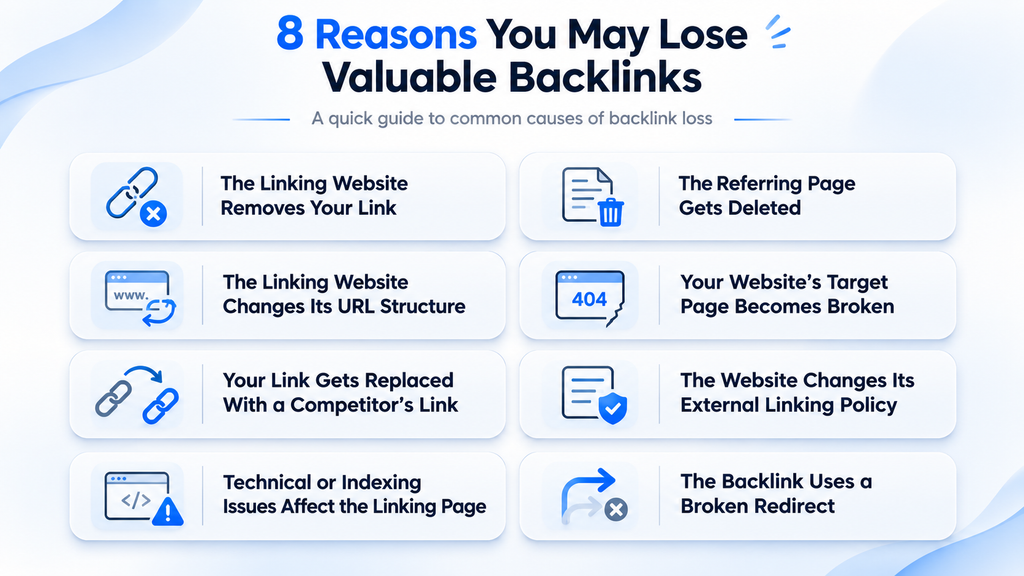
A website owner may remove your live link while updating an article, changing its content, or reviewing external references.
For example, a marketing blog might remove older resources when updating its guide to SEO tools.
What you can do:
Visit the referring page and check whether your link is genuinely missing. If your resource is still relevant, politely contact the website owner and explain why it may benefit readers.
Avoid requesting links that no longer fit the updated content.
When a website deletes the page containing your backlink, the link usually disappears with it.
Pages may be removed because the information becomes outdated, the website restructures its content, or the publisher closes a section.
What you can do:
Check whether the deleted page has been moved or replaced.
If a suitable replacement exists, contact the publisher and suggest including your resource there. If the website has permanently removed the content, recovery may not be possible.
Websites frequently change their URL structures during redesigns, migrations, or content reorganizations.
For example, a blog might move from:
“example.com/blog/seo-tips”
to:
“example.com/resources/seo-tips”
If redirects are missing or the replacement page no longer includes your link, backlink monitoring tools may report a loss.
What you can do:
Find the new page URL and check whether your backlink still exists.
If the content moved without preserving your link, contact the publisher with the updated page details.
Sometimes the problem occurs on your own website rather than the referring website.
If someone links to a page that now returns a 404 error, visitors cannot access the original resource.
Although the external backlink may still exist, it points to a broken destination.
What you can do:
Restore the original page when possible. Otherwise, redirect the outdated URL to a genuinely relevant replacement.
Google recommends appropriate permanent redirects when content moves to a new location.
Website owners sometimes replace existing backlinks with resources they consider more accurate, useful, or current.
For example, an article recommending SEO research resources may replace an outdated guide with a competitor’s recently updated version.
What you can do:
Compare your content with the replacement resource.
Identify missing examples, outdated information, or topics that need better explanations. Improve your page before contacting the publisher.
A stronger resource gives website owners a genuine reason to reconsider your link.
Some websites change how they manage outbound links.
Publishers may remove commercial references, restrict external links, or update their editorial guidelines.
These changes can affect backlinks even when your content remains relevant.
What you can do:
Review the website’s current linking guidelines before contacting its owner.
If external linking is no longer permitted, focus your efforts elsewhere rather than repeatedly requesting restoration.
A backlink may appear lost when the referring page becomes inaccessible to an SEO crawler.
Possible causes include:
Importantly, a tool reporting a lost backlink does not always mean Google has stopped recognizing that link.
What you can do:
Open the referring page manually and inspect its status.
Ahrefs explains in its documentation on lost backlink reasons that crawl errors, canonical changes, and other conditions can affect reported link status.
Some backlinks point through redirects before reaching their final destination.
When a redirect fails, leads to an incorrect page, or creates a loop, the link may stop working properly.
Example: Website A → Old URL → Broken URL
What you can do:
Check the complete redirect path using a crawling tool or HTTP status checker.
Fix redirects you control and ensure they lead to the correct destination.
Google’s guidance on crawling errors explains how to handle missing pages and appropriate replacements.
You can identify lost backlinks by comparing historical backlink records with currently active links.
SEO platforms such as Ahrefs and Semrush provide reports that help investigate backlink changes.
Follow these steps:
Record the findings in a spreadsheet, including the referring domain, lost URL, detection date, and recovery status.
Prioritize relevant links that previously provided referral traffic or supported important pages.
Remember that backlink tools maintain different databases, so their reported numbers may not match.
Recovering lost backlinks, also called backlink reclamation, involves identifying valuable missing links and fixing the problems responsible for their loss.
Most importantly, evaluate whether the backlink is worth recovering. Spending hours reclaiming an unrelated directory link may offer little benefit.
Another approach is to identify relevant websites that already mention your business or resources without a link. Turning unlinked brand mentions into backlinks can help create additional opportunities.
You cannot prevent every backlink from disappearing, but regular maintenance can reduce avoidable losses.
Consider these practices:
A strong link-building strategy also focuses on earning relevant placements from credible publications.
Understanding effective link-building techniques can help businesses develop a more sustainable backlink profile.
Make backlink monitoring part of your regular SEO audit rather than waiting for a noticeable ranking decline.
Backlinks disappear for many reasons, including content updates, deleted pages, editorial changes, and technical problems.
Understanding the cause is the first step toward recovering valuable links. Instead of focusing only on total backlink numbers, prioritize relevance, quality, and long-term link stability.
Platforms such as Linkpedia help businesses and SEO professionals discover relevant publisher opportunities and manage link placements. Combined with regular monitoring, a thoughtful link-building approach can support a more reliable backlink profile.
Backlinks suddenly disappear when referring pages are deleted, links are removed, URLs change, or crawling errors occur. Sometimes, SEO tools temporarily report existing backlinks as lost.
Losing valuable backlinks can affect Google rankings, particularly when those links contribute meaningful authority and relevance. However, ranking changes also depend on content quality, competition, and other factors.
Some permanently lost backlinks can be recovered by contacting publishers, restoring deleted resources, or suggesting relevant replacement links. Recovery depends on the website owner's decisions and circumstances.
Reviewing your backlink profile monthly is a practical starting point for most websites. Larger websites or active link-building campaigns may benefit from more frequent monitoring and analysis.
A lost backlink is no longer detected or present on its referring page, while a broken backlink still exists but directs visitors to an inaccessible or incorrect destination.
Ahrefs and Semrush can help identify lost backlinks, referring domains, and changes in link status. Manually checking important URLs helps confirm whether reported losses are genuine.